16 Jan 2026 • Payal
Apple CarPlay vs. Android Auto 2026: Which OS Offers the Best In-Car Experience?
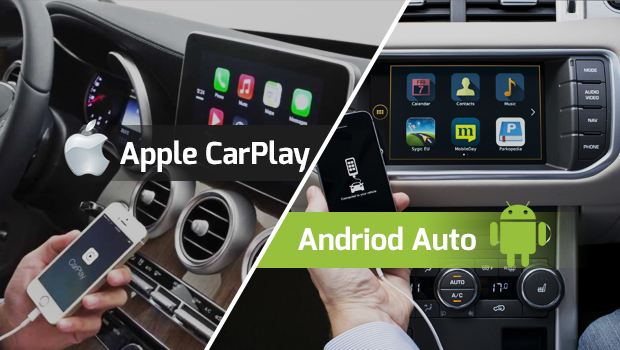
Apple CarPlay and Android Auto are evolving fast in 2026, offering smarter interfaces, deeper integration, and better voice control. This blog compares both platforms in real-world driving, explores new features like CarPlay Ultra and Google’s Gemini transition, and helps you decide which in-car OS delivers the best experience—along with practical insights from carjd.com.
Choosing between Apple CarPlay and Android Auto in 2026 isn’t just about whether you use an iPhone or Android phone anymore. It’s about what kind of driving experience you want: the look and feel of the interface, how reliable voice commands are, how quickly the system connects, how much control you get over navigation and media, and—most importantly—how smoothly it works with your specific car.
In 2026, both platforms are strong, but they’re evolving in different directions. Apple is pushing toward deeper vehicle integration with CarPlay Ultra (its next-gen CarPlay experience) while also upgrading “regular” CarPlay with new UI and features tied to iOS updates. Google, meanwhile, continues to expand Android Auto’s capabilities and refresh its interface, with a major focus on voice and app experiences—while also navigating real-world rollout challenges as it transitions from Google Assistant toward Gemini.
This guide breaks it all down in a practical way—so you can decide what’s best for your daily commute, long drives, and road trips. And if you love car tech comparisons like this, you’ll find more ownership-focused, real-world car content at carjd.com, where we regularly cover infotainment, features, and what matters for drivers.
The 2026 reality check: “Best OS” depends on your car as much as your phone
Before we compare features, here’s the most important truth: the best in-car experience is a combination of phone + car infotainment hardware + software support. Even the “best” platform feels bad if your head unit is slow, your car’s USB port is unstable, or your wireless connection drops.
Also, not every car brand is equally enthusiastic about phone projection anymore. Some automakers are leaning into their own systems or Android Automotive OS (built-in Google), and some are reducing or removing CarPlay/Android Auto support in future models. GM, for example, has been pushing away from supporting CarPlay/Android Auto in newer vehicles, favoring an integrated approach instead.
So when you’re deciding, think like a buyer: “What works best in the cars I’m actually considering?” If you’re comparing trims and infotainment features, carjd.com is a good place to cross-check what a model truly supports (wired, wireless, next-gen compatibility, etc.) in real-world terms.
CarPlay in 2026: polished, familiar, and now moving into “deep integration”
Regular CarPlay is still the mainstream experience (and it’s massive)
Apple’s standard CarPlay remains the experience most people know: a clean dashboard layout, Maps or Google Maps/Waze on the screen, music controls, calls, messages, and Siri.
Compatibility is one of CarPlay’s biggest strengths. Apple lists 800+ car models that support CarPlay. That matters because the “best OS” is irrelevant if your car doesn’t support it well.
iOS 26 brings meaningful CarPlay upgrades
Apple has been updating CarPlay alongside iOS, and iOS 26 includes a refreshed look (Apple’s “Liquid Glass” design language reaching CarPlay) plus features like widgets and Live Activities (as described in Apple’s developer content and iOS documentation).
What this means in normal language: CarPlay is trying to feel more “alive” and informative without forcing you to bounce between apps constantly. That’s exactly what drivers want—less tapping, more glanceable info.
CarPlay Ultra is the biggest shift—if your car supports it
CarPlay Ultra (Apple’s next-generation CarPlay) goes beyond mirroring apps onto the center screen. It’s designed to integrate across multiple vehicle displays, including the instrument cluster behind the steering wheel, and pull in vehicle data like speed, tire pressure, and climate controls—depending on what the automaker allows. Apple says CarPlay Ultra delivers “the best of iPhone and the best of the car” by deeply integrating with the vehicle.
The catch is availability. CarPlay Ultra is real and shipping, but it’s still early in rollout. Apple announced it first arriving with Aston Martin orders (U.S./Canada), with existing compatible models receiving updates as well. Coverage in auto media also highlights plans to expand to other regions over time.
This is where 2026 becomes interesting: if you’re buying a premium vehicle (or any model that adopts CarPlay Ultra), your “CarPlay” experience might be dramatically more integrated than what most cars offer today.
Android Auto in 2026: flexible, fast-moving, and voice-first (with some transition bumps)
Android Auto is widely supported and continues to evolve quickly. Google’s own listing states 400+ car models support Android Auto. (In practice, the ecosystem is huge—especially in mainstream segments.)
The interface philosophy: “cards” and multitasking
Android Auto’s modern layout is focused on multitasking—navigation plus media plus communication in a single, glanceable environment. Many users associate the newer UI era with a more split-screen, dashboard-like approach.
Gemini transition: big promise, messy middle
The biggest story in Android Auto isn’t just UI—it’s voice. Google has been moving from Google Assistant toward Gemini, and while the long-term goal is smarter, more natural voice interaction, real users have experienced reliability issues during the transition period, with complaints about core Assistant functionality breaking.
If you’re the kind of driver who uses voice constantly (“navigate home,” “play my driving playlist,” “call Mom”), this matters. A beautiful UI can’t compensate for voice failing at the basics.
App experience is expanding
Google has been signaling improvements for media apps and other categories, loosening restrictions to allow richer experiences and more features in-car. There’s also official documentation around app categories and “parked” experiences (like video apps while parked) in Android’s car ecosystem.
In simple terms: Android Auto is trying to become more capable without becoming distracting, and it’s doing it by expanding what apps can do—especially when parked.
Head-to-head comparison: what feels better in daily driving?
1) Interface and ease of use
CarPlay’s biggest advantage is that it feels consistent. If you’ve used CarPlay in one car, you’ll feel at home in another. Apple’s design tends to be predictable, visually clean, and easy to scan quickly. With iOS 26 updates bringing a refreshed look, CarPlay stays modern without feeling chaotic.
Android Auto tends to feel more flexible and “live,” especially in how it uses screen space for multitasking and cards. But the experience can vary more depending on device, car screen size, and software version.
Who wins?
If you want a calmer, more uniform experience, CarPlay often feels better. If you like a dashboard-style multitask layout, Android Auto can feel more powerful.
2) Navigation quality
In real life, navigation is usually what matters most. Both platforms support multiple nav apps, and both generally do the basics well: reroutes, ETA, lane guidance (depending on app), and voice guidance.
CarPlay benefits from Apple’s tight OS integration, and Apple heavily markets CarPlay as a safer way to use your iPhone on the car display. Android Auto benefits from Google’s mapping ecosystem and deep Google services integration.
Who wins?
If you already live in Google Maps and your Android phone is your life hub, Android Auto is hard to beat. If you’re deep in Apple’s ecosystem and prefer Siri + Apple Maps + iPhone continuity, CarPlay wins for “it just fits.”
3) Voice control and hands-free reliability
This is where the 2026 landscape matters a lot.
Apple’s Siri experience in the car is stable and familiar, and CarPlay Ultra still uses Siri as part of the experience (while Apple Intelligence features may enhance what happens on the phone side depending on your device and region).
Android Auto’s voice story is more ambitious right now because of Gemini—but that ambition has come with a transition period where some users report voice commands becoming unreliable.
Who wins?
If you care most about “it works every single time,” CarPlay often feels safer today. If you want the most advanced future voice experience and you’re okay with some rollout bumps, Android Auto has momentum.
4) Connectivity: wired vs wireless, stability, and lag
Both ecosystems support wired and wireless (depending on car). Wireless is convenient, but it can introduce lag, connection issues, and battery drain.
Also, the industry is improving around charging and phone integration. For example, newer vehicles are adopting better charging standards like Qi2 magnetic wireless charging (a 2026 Nissan example was reported), which makes “wireless everything” feel more realistic.
Who wins?
It’s mostly a tie—your car’s hardware matters more than the OS here. On carjd.com, it’s worth checking if a specific model supports wireless projection well (not just “yes/no,” but whether owners report it’s reliable).
5) Deep vehicle integration: the new battleground
This is where CarPlay Ultra is trying to define the future. If CarPlay Ultra becomes common, Apple’s approach could feel like a true “in-car OS layer,” not just phone mirroring.
But automakers are cautious: some prefer to control the cockpit experience, some want subscription revenue from their own systems, and some are exploring Android Automotive (built-in) instead. There are also real-world examples of automakers not adopting next-gen CarPlay immediately—even when people expected it.
Who wins?
If your car supports CarPlay Ultra, Apple might deliver the most premium integrated experience. If your car brand is moving away from projection entirely, Android Auto vs CarPlay becomes irrelevant—your car’s native OS becomes the main story.
Which one should you choose in 2026?
Choose Apple CarPlay if…
You want a clean and consistent UI, you’re already deep in the iPhone ecosystem, and you care about a stable, familiar experience across different vehicles. CarPlay’s broad model support also makes it a safe recommendation for most buyers.
And if you’re shopping in segments where CarPlay Ultra is available, that deeper integration could be a big reason to prioritize CarPlay.
Choose Android Auto if…
You rely on Google services, like a more dashboard-style interface, and want a platform that evolves quickly with new capabilities. Android Auto is also great for users who want flexibility and strong integration with Android’s ecosystem and apps.
Just be aware that voice reliability may vary during the Gemini transition, depending on rollout and region.
The most practical advice for car buyers
If you’re buying a car in 2026, don’t decide only based on “CarPlay vs Android Auto.” Decide based on:
- Does the exact trim support wireless or only wired projection?
- Is the screen large enough and placed well?
- Is the car’s infotainment system fast and stable?
- Does the brand restrict features or push paid subscriptions?
- Do you share the car with someone on a different phone OS?
For comparisons by model and feature breakdowns, carjd.com is the right kind of resource to keep in your research stack.
FAQs
1) Is CarPlay better than Android Auto in 2026?
CarPlay is often better for people who want a consistent, polished experience and strong iPhone integration, while Android Auto can feel more flexible and feature-forward—especially if you’re deeply tied to Google services. CarPlay Ultra also raises Apple’s ceiling for premium integration, but availability depends on automakers.
2) Which one has more car compatibility?
Apple lists 800+ models supporting CarPlay, while Google’s listing states 400+ models supporting Android Auto.
3) What is CarPlay Ultra and why does it matter?
CarPlay Ultra is Apple’s next-generation CarPlay that can integrate across multiple vehicle displays and incorporate car data like climate and vehicle status—depending on what the automaker supports. It matters because it turns CarPlay from “phone mirroring” into something closer to an integrated cockpit experience.
4) Is Android Auto getting Gemini?
Google has discussed Gemini replacing Google Assistant in the car experience, and reports indicate the transition is happening gradually—though some users have reported issues with Assistant reliability during the rollout period.
5) Why are some carmakers removing CarPlay and Android Auto?
Some automakers want more control over the in-car software experience and revenue opportunities (subscriptions, app ecosystems, user data). GM has notably pushed toward its own integrated system rather than supporting CarPlay/Android Auto in certain newer vehicles.
6) Do wireless CarPlay and wireless Android Auto drain battery?
Yes—wireless projection typically uses Wi-Fi + Bluetooth and can drain your phone faster than wired. A good in-car charging solution (especially improved wireless chargers in newer vehicles) makes a big difference.
7) What should I check on a test drive to judge the infotainment experience?
Try the basics: connect your phone, start navigation, change music apps, take a call, and use voice commands. Also check whether the system reconnects quickly after turning the car off/on. If you’re researching before a test drive, looking up model-specific infotainment notes on carjd.com can save you time.